Within Online Claims
Can You Trust That Viral Video?
Photos and videos can be real but still mislead when they are cropped, recaptioned, edited, staged, or reused from another event.
On this page
- Ways real visuals become misleading
- Reverse image search and geolocation basics
- Context clues that change what a video proves
Page outline Jump by section
Introduction
Photos and videos often feel like the strongest kind of evidence because they appear to show events directly. Yet a genuine image can still support a false claim if it is shared with the wrong date, location or explanation. A cropped photograph can hide crucial details, an old video can be presented as today’s news, and authentic footage from one country can be falsely labelled as another. Before treating a visual post as evidence—or passing it on—it is worth checking not only whether it is real, but also whether it proves what the accompanying caption claims. Professional fact-checkers routinely verify visuals through independent methods rather than accepting them at face value, and many of the same techniques are available to the public.[InVID project+2Citizen Evidence Lab]invid-project.euInVID projectInVID Verification PluginThe provided tools allow you to quickly get contextual information on Facebook and YouTube videos…
Ways Real Visuals Become Misleading
The most common problem is not fabricated imagery but genuine media presented out of context.
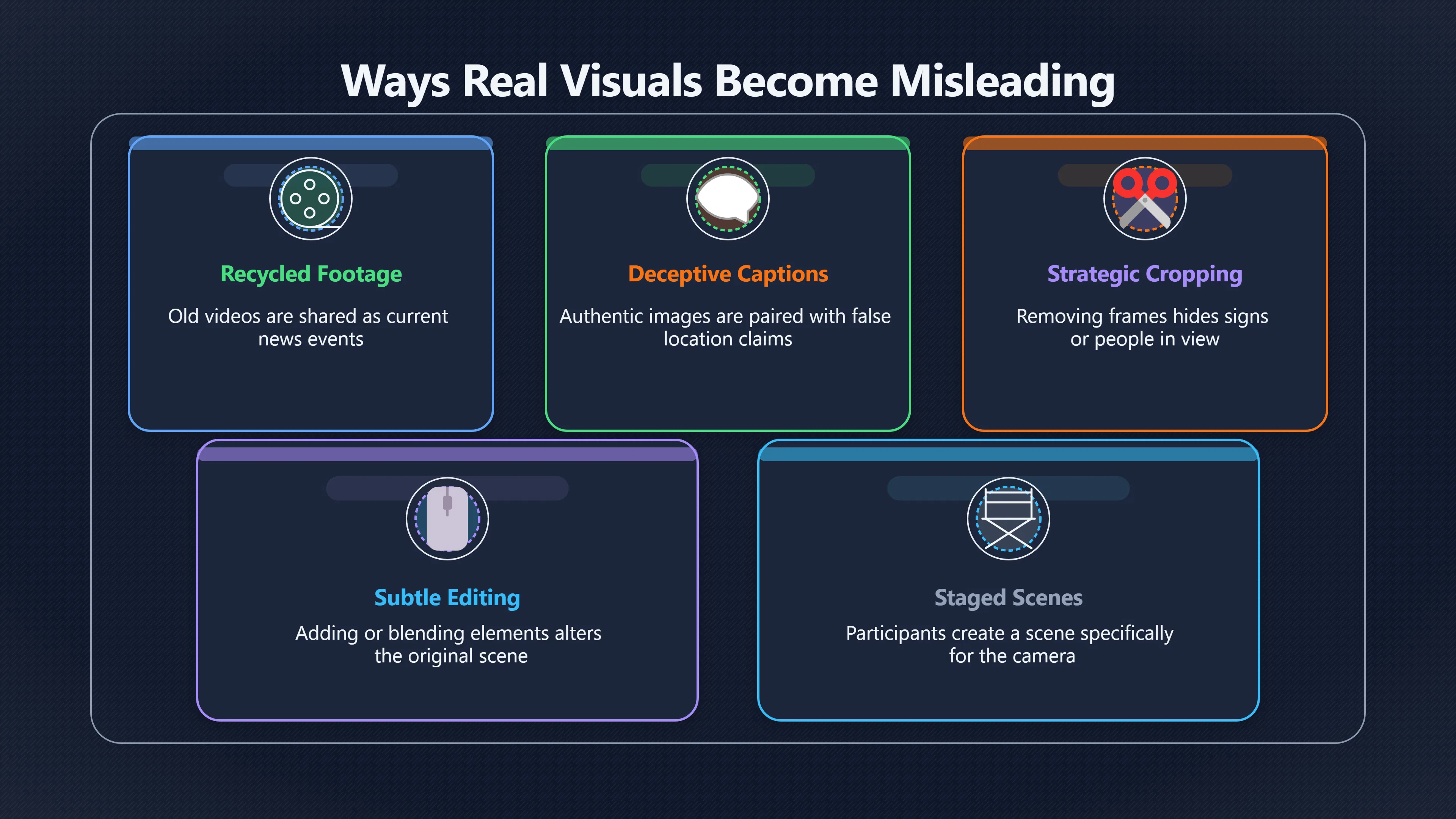
A photograph or video can mislead in several ways:
- Reused from another event. During wars, natural disasters and protests, years-old footage is frequently recirculated as if it were recorded that day. Reverse image searches often reveal earlier appearances that expose the false timeline.[Citizen Evidence Lab]citizenevidence.orghow to use reverse image search for human rights investigationsCitizen Evidence LabHow to: Use Reverse Image Search for Human Rights…29 Jan 2020 — A reverse image search allows an investigator to s…
- Recaptioned. A real image may depict one place while the caption claims it was taken somewhere else.
- Cropped. Removing parts of a frame can conceal people, signs or actions that change the interpretation.
- Edited. Images may be altered by removing, adding or blending elements. Some edits are subtle enough that they require closer inspection.
- Staged. A scene may genuinely have been photographed, yet participants deliberately created it for the camera rather than documenting a spontaneous event.
- Selective. A short clip may omit what happened immediately before or after, making actions appear justified or unprovoked when the full sequence tells a different story.
These possibilities mean that authenticity alone is not enough. The key question is whether the visual accurately represents the claim being made about it.
Reverse Image Search and Geolocation Basics
One of the fastest ways to investigate a suspicious image is a reverse image search. Instead of searching with words, you upload the image or a screenshot so search engines look for visually similar matches.
If an image appeared online months or years before the event it supposedly documents, that is strong evidence that the current claim is misleading. Reverse searches can also uncover higher-resolution originals, news reports, or the account that first published the media. Fact-checkers often search across multiple services because each indexes different parts of the web.[Citizen Evidence Lab+2First Draft]citizenevidence.orghow to use reverse image search for human rights investigationsCitizen Evidence LabHow to: Use Reverse Image Search for Human Rights…29 Jan 2020 — A reverse image search allows an investigator to s…
For videos, searching the whole file is usually less effective. Instead:
- Pause the video at distinctive frames.
- Capture screenshots showing landmarks, vehicles, clothing or signs.
- Perform reverse image searches on those individual frames.
- Compare the results with the claim being made.
Verification tools such as the InVID-WeVerify browser extension automate much of this process by extracting key frames, displaying metadata where available and linking directly to multiple reverse image search engines.[WeVerify]weverify.euVerification pluginThe InVID-WeVerify verification plugin is one of the most powerful tools for spotting misinformation online.Re…
Geolocation adds another layer of checking. Ask whether visible features match the claimed location:
- Do road markings, licence plates or traffic signs fit the country?
- Are mountains, skylines or coastlines consistent with maps or satellite imagery?
- Do shop names, language and architecture match the claimed place?
- Are weather conditions and vegetation plausible for that season?
You do not always need to identify the exact location. Showing that a claimed location is implausible can already weaken the evidence considerably.
Context Clues That Change What a Video Proves
Videos often appear persuasive because movement creates a stronger sense of reality than a still photograph. However, context determines what a video actually demonstrates.
Pay attention to:
- Beginning and ending. Viral clips often start after the crucial events have already occurred.
- Original upload date. An upload timestamp may differ from the date being claimed.
- Audio. Music, narration or dubbed speech can dramatically alter interpretation. In some cases, audio has been replaced entirely.
- Camera perspective. A single viewpoint may exclude important activity occurring outside the frame.
- Compression and reposting. Multiple generations of uploads can remove metadata and visual detail, making forensic analysis harder.
It is also worth asking whether independent reporting supports the same interpretation. If a dramatic incident genuinely occurred in a public place, multiple photographs, videos or eyewitness accounts often emerge from unrelated sources.
A Practical Five-Minute Verification Routine
For everyday social media use, you do not need to perform a professional investigation. A short pause before sharing can eliminate many false claims.
- Read the caption separately from the visual. Ask what the image itself actually shows.
- Search for earlier appearances. Use reverse image search or screenshots from videos.
- Look for the original uploader. Earlier uploads generally provide more reliable context than widely reshared copies.
- Compare with trusted reporting. Check whether reputable news organisations or established fact-checkers describe the same event in the same way.
- Delay sharing if key questions remain unanswered. Uncertainty is a reason to wait, not a reason to speculate.
This approach reflects the broader habit of lateral reading: looking beyond the post itself instead of relying on its presentation or popularity.[Wikipedia]WikipediaOpen source on wikipedia.org.
Why AI Makes Context Checks Even More Important
Generative AI has made convincing synthetic images and videos easier to produce, but experts caution that context remains as important as pixel-level analysis. Many misleading viral posts still rely on older techniques such as recycled footage, deceptive captions or selective editing rather than fully AI-generated media. Verification therefore depends less on spotting visual artefacts than on tracing provenance, comparing independent sources and checking whether the claimed time and place withstand scrutiny.[The Verge]theverge.comTrusted digital investigators like The New York Times, Bellingcat, and Indicator rely on rigorous verification protocols to discern real…
Rather than asking, “Does this look real?”, a stronger analytical habit is to ask, “What exactly does this visual prove, and what independent evidence supports that conclusion?” That shift turns an emotionally compelling post into a claim that can be tested instead of merely believed.
Amazon book picks
Further Reading
Books and field guides related to Can You Trust That Viral Video?. Use these as the next step if you want deeper reading beyond the article.
Factfulness
Helps readers recognize common reasoning errors and avoid being misled by compelling but inaccurate narratives.
The Skeptics' Guide to the Universe
Strengthens the habits of evidence-based reasoning needed to assess viral photos, videos, and extraordinary online claims.
Calling Bullshit
Builds skepticism and evidence-evaluation skills that apply directly to misleading viral visuals and online misinformation.
The Art of Invisibility
Provides useful background on digital footprints, online investigation, and verifying information in the digital world.
eBay marketplace picks
Marketplace Samples
Example marketplace items related to this page. Use the search link to explore similar finds on eBay.

Endnotes
1.
Source: invid-project.eu
Link:https://www.invid-project.eu/tools-and-services/invid-verification-plugin/
Source snippet
InVID projectInVID Verification PluginThe provided tools allow you to quickly get contextual information on Facebook and YouTube videos...
2.
Source: weverify.eu
Link:https://weverify.eu/verification-plugin/
Source snippet
Verification pluginThe InVID-WeVerify verification plugin is one of the most powerful tools for spotting misinformation online.Re...
3.
Source: Wikipedia
Link:https://en.wikipedia.org/wiki/Fact-checking
4.
Source: citizenevidence.org
Title: how to use reverse image search for human rights investigations
Link:https://citizenevidence.org/2020/01/29/how-to-use-reverse-image-search-for-human-rights-investigations/
Source snippet
Citizen Evidence LabHow to: Use Reverse Image Search for Human Rights...29 Jan 2020 — A reverse image search allows an investigator to s...
5.
Source: theverge.com
Link:https://www.theverge.com/tech/888303/photo-video-fake-news-verification-nyt-bellingway
Source snippet
Trusted digital investigators like The New York Times, Bellingcat, and Indicator rely on rigorous verification protocols to discern real...
6.
Source: firstdraftnews.org
Link:https://firstdraftnews.org/wp-content/uploads/2021/03/First-Draft-Vaccine-Insights-Flexible-Learning-Course-6.pdf
Source snippet
Right-click on any image, hit “Search Google for image”... The main search bar has an option to “Try Visual Search”.Read more...
Additional References
7.
Source: rand.org
Link:https://www.rand.org/research/projects/truth-decay/fighting-disinformation/search/items/video-verification-plugin-invid.html
Source snippet
Video Verification Plugin (InVid)InVid is a plug-in toolkit designed to assist fact-checking through video verification. The tool provide...
8.
Source: facebook.com
Title: 🧐🔍 5 digital tools to check fact or fake
Link:https://www.facebook.com/UNDPThailand/posts/-5-digital-tools-to-check-fact-or-fakeai-and-deepfakes-are-highly-sophisticated-/1340081801495479/
Source snippet
AI and Deepfakes...Tools like Google Lens and InVID can be used to conduct a reverse image search to find an original image or video, an...
9.
Source: bellingcat.gitbook.io
Title: Bellingcat In VID
Link:https://bellingcat.gitbook.io/toolkit/more/all-tools/invid
Source snippet
InVID - Bellingcat's Online Investigation Toolkit - GitBook3 May 2026 — InVID provides tools for analyzing video authenticity b...
Published: May 2026
10.
Source: innovation.dw.com
Link:https://innovation.dw.com/kid-verification-toolbox/index.html
Source snippet
TOOLBOX: LEARN TO VERIFYThe best way to learn more about a specific image is to do a reverse image search (RIS). It tells you if the imag...
11.
Source: youtu.be
Title: 👉 How to Get a List of All Worksheet Names Automatically in Excel
Link:https://youtu.be/1MkeZmFehhg?si=L4vZJGgF4PDa4NjO
Source snippet
👉 Create Multiple Folders at Once with this trick...
12.
Source: chromewebstore.google.com
Link:https://chromewebstore.google.com/detail/fake-news-debunker-by-inv/mhccpoafgdgbhnjfhkcmgknndkeenfhe?hl=bn
Source snippet
news debunker InVID WeVerify VeraAI - Chrome ওয়েব...This toolbox allows you to quickly get contextual information on Facebook and Twitt...
13.
Source: youtu.be
Title: 👉 How to Remove a Picture Background Quickly
Link:https://youtu.be/PWZOMFFW9_0?si=IzL35luYMuY343G3
Source snippet
👉 How to Get a List of All Worksheet Names Automatically in Excel...
14.
Source: youtu.be
Title: 👉 How to Delete a Blank Page in Word You Can’t Delete
Link:https://youtu.be/suEW7mgAOaw?si=-ORFud_jUXTqh_Bm
Source snippet
👉 How to Remove a Picture Background Quickly...
15.
Source: youtube.com
Title: Reverse Image Search: The Skill Every Student Needs Now
Link:https://www.youtube.com/watch?v=DnlWTmegAG4
Source snippet
How to Fact Check Using Google Reverse Image Search...
16.
Source: youtu.be
Title: Additional Sources
Link:https://youtu.be/p5e9wTdAulA?si=e4oLmmfG-yDr-osT
Source snippet
How to do a reverse image search - YouTube AFP News Agency...
Topic Tree